Risk Register
Centralized risk tracking with probability/impact scoring, mitigation plans, and reserve allocation.
Risk Overview
The Risk Register provides a centralized view of all identified risks across your wind portfolio. Risks are created in two ways:
- Automatically — when a DD campaign is promoted to master data, component assessments with medium or higher risk ratings seed the register.
- Manually — click + New Risk to log risks from inspections, work orders, CMS alerts, or other sources.
The summary cards at the top show risk counts by severity level and total annual reserve allocation:
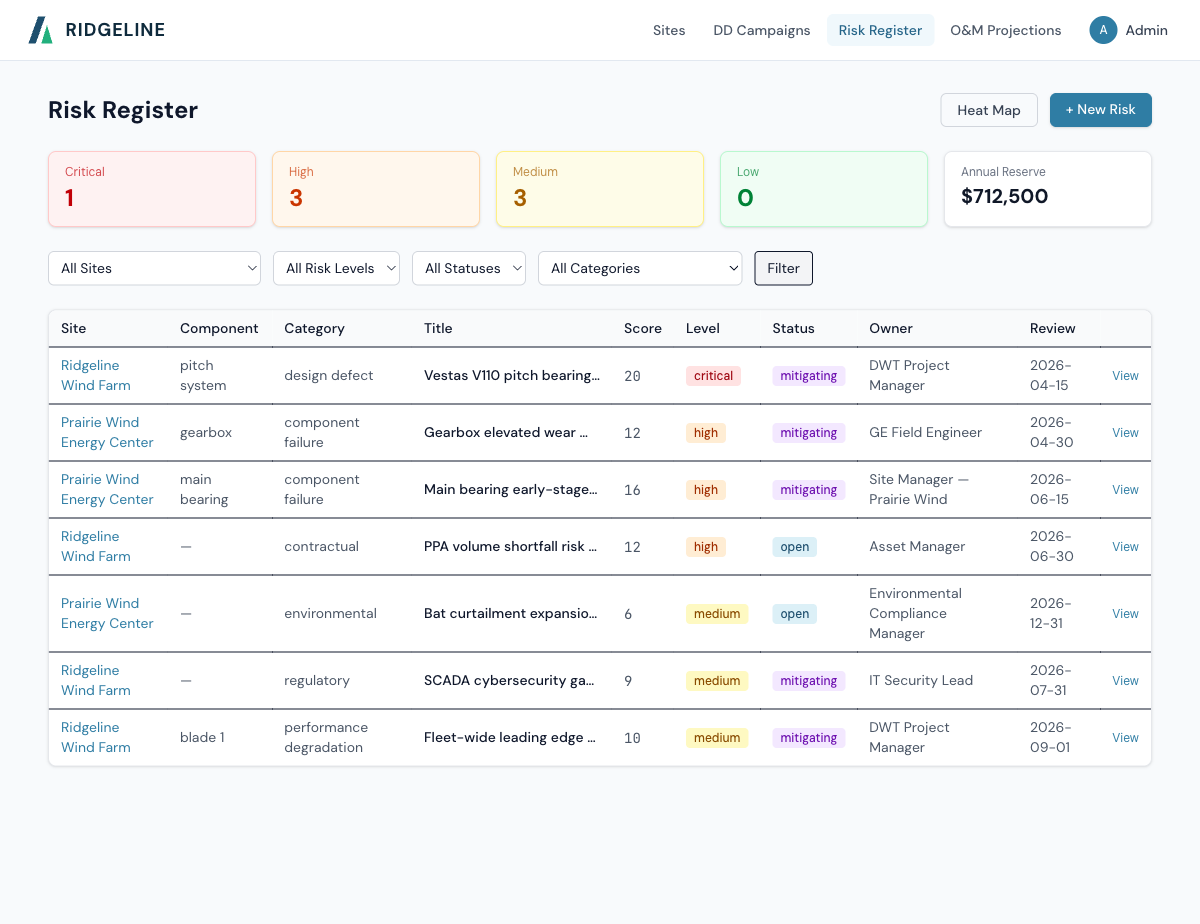
Risk Register with severity summary cards and filter controls.
Filtering Risks
Use the filter bar to narrow the risk list by:
- Site — specific wind site or all sites
- Risk Level — Critical, High, Medium, or Low
- Status — Open, Mitigating, Accepted, Closed, or Realized
- Category — Component Failure, Performance Degradation, Contractual, Regulatory, Environmental, Grid, or Design Defect
Each risk entry tracks:
| Field | Description |
|---|---|
| Probability | Rare, Unlikely, Possible, Likely, Almost Certain |
| Impact | Negligible, Minor, Moderate, Major, Catastrophic |
| Risk Score | Calculated from probability × impact |
| Risk Level | Low, Medium, High, or Critical |
| Estimated Cost | Financial impact if the risk is realized |
| Annual Reserve | Recommended annual budget allocation for this risk |
| Mitigation Plan | Documented steps to reduce probability or impact |
| Owner | Person responsible for monitoring and mitigation |
| Review Date | Next scheduled review |
Heat Map
Click Heat Map to view a visual probability-impact matrix. Each cell shows the count of risks at that intersection. This view helps identify concentration areas in your risk profile.
Portfolio Risk Heat Map showing risk distribution across probability and impact levels.
Creating a Risk
To manually create a risk entry:
- Click + New Risk from the Risk Register.
- Select the associated Site, and optionally a specific turbine and component.
- Choose a Risk Category (Component Failure, Performance Degradation, Contractual, etc.).
- Enter the risk title, description, and failure mode.
- Set Probability and Impact levels. The risk score and level are calculated automatically.
- Document the mitigation plan, assign an owner, and set a review date.
- Click Create Risk.